
Restore balance. Accelerate growth
The Iraq RFP Blueprint: 2000 questions that saved millions
The RFP will have a major influence on the selection criteria by defining all the specifics of what you are buying and the best offer from the vendor that has tailored the solution to your situation.
The Philosophy
90% checkboxes
vendors reveal themselves without realizing it.
10% written statements
such as, the proposer’s history, mission, programs, and services; administrative structure, experience, etc.
The Framework
The vendor evaluation framework can be applied to projects across many industries. For this guide, however, we focus on healthcare due to its unique complexity and regulatory landscape.
Explore the key evaluation criteria in the sections below
Partnership situation with this vendor
Try to find win-win solutions whenever practical. Remember that once the contract negotiation is over, you will be in a partnership situation with this vendor. A one-sided win is never successful.
You must ensure that the vendor understands that the response to the RFP and implementation plan will become part of the contract, and allow it to make any changes necessary to conform to the requirements.
Also keep track of any issues that arise during the selection process that you may want to negotiate or attach to the contract before signing.
To develop a list of issues, build off the list started during the selection process. Add issues based on a thorough review of the solution, such as:
- Product capabilities
- Cost and payment terms
- Technical issues
- Installation and implementation
- Legal issues, including the HIPAA compliance
- Other business and contractual terms
Clarify exactly what you are buying and what the vendor is selling, including:
- Hardware – what devices
- Software – what applications
- Implementation support
- Interfaces
- Data and chart conversions
- Customization
- Networks/infrastructure
- Testing
- Training
Conduct implementation planning and attach the plan to the contract. At a minimum, the implementation plan should include:
- Project phasing (if any)
- Project start and go-live dates
- Key milestones
- Level of effort for buyer
- Level of effort for seller
- Recommended project organization chart
Consider a final due diligence to respond to any final questions or concerns you may have about product capabilities before getting too deep into it.
The terms of the agreement can have financial implications far beyond the price. The following contract items need to be carefully considered.
Fixed fee for implementation? Expense controls/cap?
Payment terms
What/when is final system acceptance
Maintenance/support fees and inflation clauses
Price protections
Preparation for Vendor Selection Personal Goals List
These goals will guide you with the selection of vendors; and they are separated into four categories:
Functionality (features):
This list should include, but is not limited to goals about: patient encounter documentation, automating and facilitating office workflow, decision support during patient encounters, reporting that supports care management, and template customization.
Usability (speed and ease of use):
This list should include, but is not limited to goals about: tasks often done that must be done fast, peculiarities of the practice such as computer literacy, and desired input method that impact usability.
Practicality (price, interfaces, support):
This list should include, but is not limited to goals about: price, integrated versus interfaced practice management system, interfaces with labs, etc., internal resources needed to customize and maintain the database, etc., overall support needs.
Reputation (company history, longevity, etc.):
This list should include, but is not limited to goals about: how established the vendor needs to be (level of risk adversity), what sort of relationship you would like to have with the company—you’re not just buying software; you’re forming a relationship with a company whose software will change over time.
Contingencies
- Is your organization going to change (grow, shrink, refocus, etc.)?
- Ensure the contract has provisions for the vendor to keep the product current with federal, state, and regulatory requirements
- What if the vendor leaves the business (software replacement clause, escrow, etc.)?
Functional Features
Functional General Features
- For multiple office locations
- For multiple users simultaneously
- Multiple encounter records on the same patient to be open simultaneously (e.g., phone call plus office visit)
- Multiple patient records to be open simultaneously
Workflow Management Tools
- Provider schedules
- Prioritized task lists by user
- On-screen flags to indicate patient visit status
- Customized work flows by provider/clinician
Documentation Methods Example
- Note templates
- Templates customizable by practice and or provide
- Pick lists customizable by practice and or provider
- Free-hand drawings
- Scanned images
- Annotations to images and video imaging
- Support repeat vital signs readings on the same visit (e.g., repeat pulse, blood pressure)
- Support error checking for vital sign data entry
Documentation/results reporting types
- Chart notes for visits
- Emergency room reports
- Lab results, radiology reports, consultation reports, discharge summaries
- Medication lists, Allergy lists, Prescriptions
- Referral letters and Letter summaries for referring physicians
- Ability to create custom forms for any purpose
- Prompts, Alerts & Reminders
- Unfinished patient chart documentation
- Provider alerts for missing charting elements
Medical History and Charting
- Capture of history, family history, physical exam data, risk factor tracking, allergy types, etc.
- Current health status, problem lists, progress notes etc.
Medication/ Prescription Writing
- Drug database, cost information, dosage algorithms
- Maintains multiple formularies
- Formulary linked to patient benefits
- Drug–allergy checking, drug-drug interaction, drug-food checking, weight-based dosing, BSA & MBR calculations, etc.
Order Management
- On-line ordering, order cancellation, common-list of orders, auto suggestion of orders, notifications, etc.
- Graphing of results to medications and other clinical data
- Printing & Transmission Of Full Patient Record
- Print full patient record, transmit records electronically, encryption, print only selected items/fields
Coding
- Current diagnosis and procedure codes built-in
- Coding updates
- E&M coding advice to providers based on documentation
- Automated translation of the following codes to data: CPT (4 and 5), ICD9-CM, ICD-10, SNOMED, etc.
- Procedure & diagnosis to patient age and gender
- Signing/ Authentication
- Electronic signatures, signing of individual sections, records locked after signature, co-signature of records
- Authentication required when medication ordered, when orders transmitted, etc.
Clinical Reporting
Comparative reports
Query function and customizable report writer, mail merge, ability to schedule reports for regular production
Exporting of data for further analysis
Functional Features – Continue
Clinical Decision Support
- Point of care decision support tools
- Patient registry and outreach reports
- Practice analysis tools & reports
- Plotter support capability
Practice Management (PM)
- Integrated with PM system
- Demographics uni-directional interface (PM to EMR)
- Demographics bi-directional interface
- Billing / coding interface (EMR to PM)
- Access to PM financial / insurance information
- Access to PM appointments and scheduling
Other Interfaces & EDI
- Lab orders and results between lab & EMR
- Radiology orders and reports between X-ray & EMR
- Diagnostic images (X-ray to EMR)
- Other diagnostic tests
- Electronic payer connectivity
Display Options (In addition to text) & Custom Views
HIPAA compliant access audit trail
Views customizable by user such as patient name, ID, account number, Social Security number, EMR number, etc.
Data Searching
By date, by problem, by encounter, etc.
Access limited by encounter type
Screen time-outs
Technical
Security
- Support inquiry, update and delete capabilities for all information entered based on user security level
- Provide multiple levels of security with definable levels of privilege (e.g., application, function, job function, functional group, screen, user)
Support a security reporting function including, but not limited to:
- User audit trail
- All users who have used a given function
- All users who have updated a given record
- Provide security to control remote access (e.g., dial back, VPN)
- Support the creation and use of “profile templates” and provide a method for defining access privileges for groups of users
- Report Writer
Here you can define all the requirements for generating reports. Such as
- Provide one integrated report writer with access to all fields within all modules
- Provide a report writer that is menu driven
- Provide templates (e.g., “Query for Example”) for customization and the creation of new reports
- supports Boolean logic included as a report writer capability including:
Hardware
- Support the use of portable devices (e.g., pen tablets) for the collection of data for subsequent upload to the appropriate module
- System fully integrates and supports web based technology.
- Allow reports to be viewed on-line?
Network Access
User authentication is supported for data access
Application can be executed in a thin client environment such as Citrix.
System allows for full automated backups
System allows for incremental automated backups
System able to send messages to users through the corporate mail server
Firewall between Internet and corporate network
Others
Documentation and Tutorials
- Provide summarized user guides for screens, templates, dictionary, self-paced training, etc.
On-Line Help
- Provide on-line prompting for menu-screen selections, on-line help & support, etc.
- Provide “pull-down” menus for screen prompting
Sample Questions
Explore a couple of example questioners in the sections below
CLINICAL CONTENT SAMPLE Q’s
- Please describe your typical approach and/or options to building the clinical content needed for order entry/CPOE to achieve standardization and patient safety (e.g., order sets, clinical decision support, standardized documentation, etc.).
- Describe the types and number of order sets and alerts/reminders you provide with the order entry module, i.e., ‘starter set’? If you provide these, please provide details.
- Describe your system ability for dealing with standardized order sets by specific physicians vs. diagnosis?
- Describe in detail the clinical content that is provided with your clinical system. Provide numbers and types of content including order sets (if not described in #2 above), clinical rules and alerts, care plans, etc.
- Describe how the clinical content is maintained in your application.
- Does your system support the import of 3rd party clinical content? If so, please describe the process and how is existing content impacted.
- List the 3rd party vendors that you are aligned with for providing clinical content. Describe any additional costs for this 3rd party software.
- Describe how your system allows the ability to aggregate data directly from the Clinical Data Repository (CDR) for regulatory initiatives – e.g., THE JOINT COMMISSION core measures, IHI sepsis bundle compliance, etc.
- Describe your system’s ability to integrate various care protocols into general assessment, scoring, implementation and on-going reassessment into the EMR – i.e., falls, pressure ulcers, groin management, restraints, moderate sedation protocols, central line placement protocols, etc.
- Describe how the system assists with adherence to patient safety goals from THE JOINT COMMISSION– program screening, implementation, compliance monitoring, etc.
- …..
ORDER MANAGEMENT – Order Processing
- System shows patient core data on order screen (i.e., height, weight, problem list, diagnosis, allergies, attending physician, etc.) with ability to drill down into history
- System shall provide capability for “Favorite Orders” folder by provider that do not require re-setup after system upgrades.
- System shall support orders templates with default values and pick lists to aid in order entry Orders can be entered directly from the clinical pathway/care plan
- System shall provide the ability to free-form miscellaneous orders
- System shall support all types of orders: such as, STAT, one time, recurring, continuing, corollary, pending, PRN, order sets, standing orders, serial etc.
- System shall support the use of conditional orders, as well as protocols and pathways
- System supports customizable prioritization of orders
- System supports special orders such as restraints, code status, etc. with accompanying documentation required (or prompts)
- System shall provide the ability to “hold” future orders and automatically change order when that future time arrives (i.e. NPO after midnight would be held in the system until midnight and the order would automatically change to NPO at midnight)
- System shall have the capability to modify existing order and have the revisions highlighted. Alert pharmacy / ancillary / provider as appropriate.
This process was forged in a war zone.
When Iraq needed to rebuild its healthcare infrastructure, we didn’t have room for error. The result was an RFP so detailed that the big 3 vendors took 6-8 weeks to respond, and praised its depth.
The Outcome
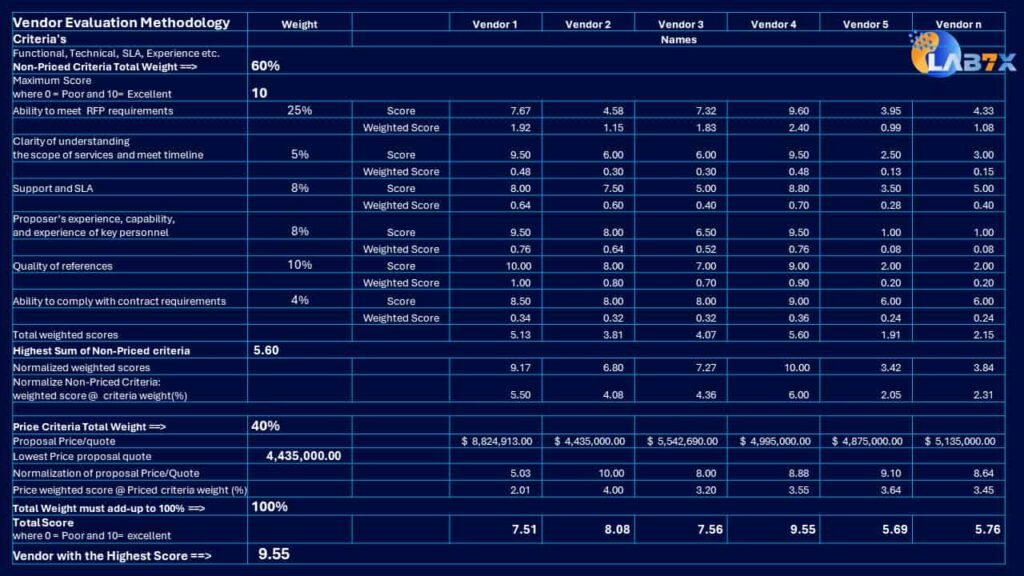
This is how the framework protected millions of dollars in healthcare IT investment
This is how we turned 2000 answers into an objective, defendable decision.
Restore balance. Accelerate growth
Ready to protect your investment?
Not sure where to start? Tell us about your needs, and we’ll show you how deep an RFP can go.